
ORVESTRA · WIKI
Home - daily overview
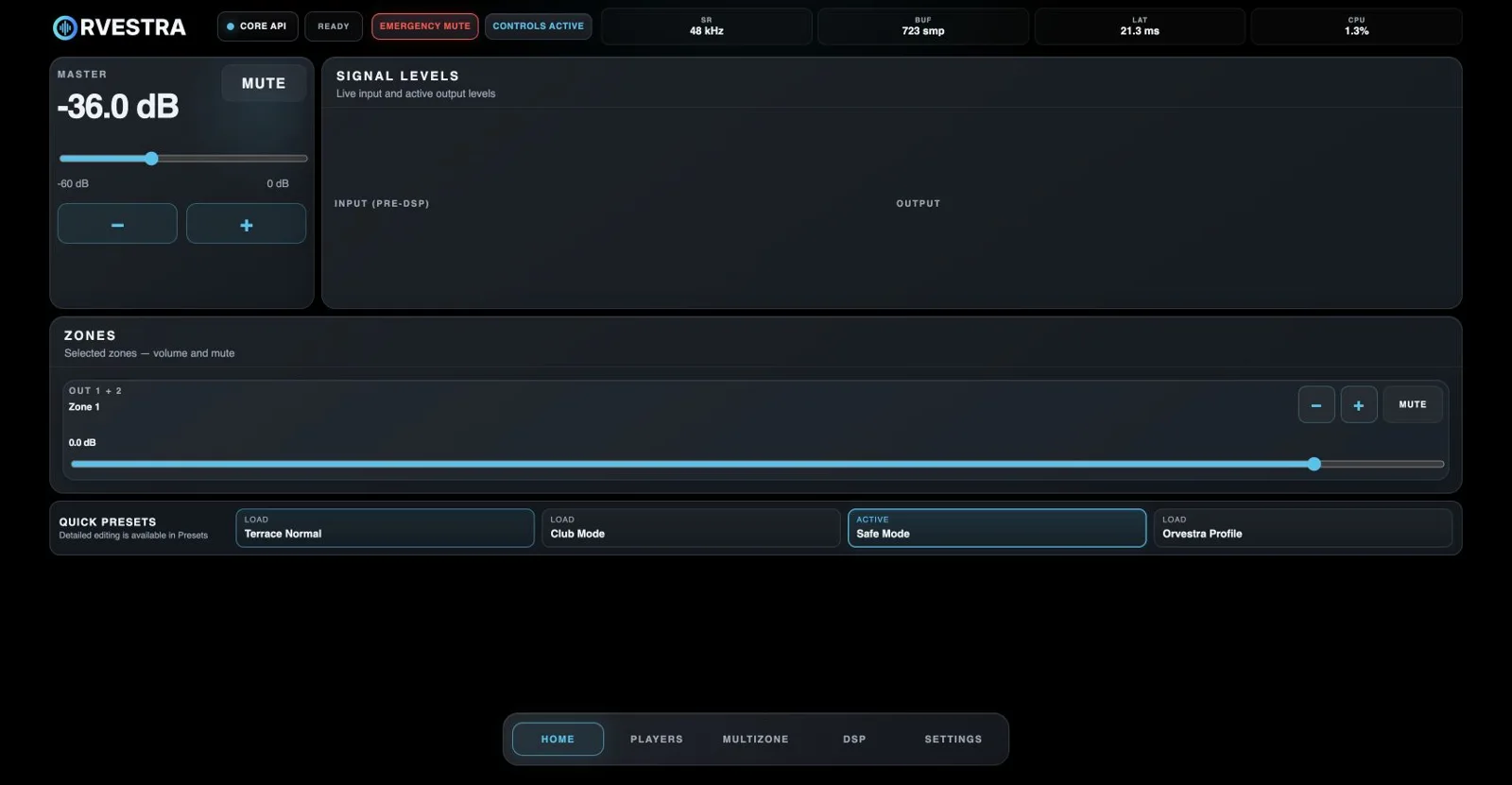
Emergency mute
Immediately mutes the system. Use it to stop sound quickly; it is separate from locking the controls.
Controls active / locked
Locks or unlocks operation. When Controls PIN is enabled, unlocking requires the correct PIN.
Master Mute
Mutes the master audio output. Clicking again toggles the mute state.
Master volume
Sets the overall system level. The dB value shows the current gain.
Master -
Lowers master volume by one decibel.
Master +
Raises master volume by one decibel.
Zone -
Lowers the corresponding zone volume on Home.
Zone +
Raises the corresponding zone volume on Home.
Zone mute
Mutes only the selected zone.
Zone volume on Home
Sets the indicated zone level. Only enabled zones with Show on home appear here; for a Slave zone this is relative trim.
Quick presets
Loads the selected performance preset. Active identifies the current preset. The first four named slots are shown.
Home
Opens the daily view of master volume, meters, visible zones and quick presets.
Players
Opens zone players, the local cue and server playlists.
Multizone
Opens scenes, zones, announcements, physical output routing and Video.
DSP
Opens audio processors and their presets.
Settings
Opens licensing, updates, storage, access, presets, hardware and the tone generator.
CORE API and write status
CORE API identifies the Core API connection. Ready means no write is pending; syncing means a write is in progress, synced confirms it, and error indicates failure.
SR
Audio-engine sample rate; 48 kHz in this capture. This is a readout, not a sample-rate selector.
BUF
Reported audio-engine buffer size in samples (smp).
LAT
Reported audio-engine latency in milliseconds. It does not describe the full video or end-to-end system delay.
CPU
Reported audio-engine load, which varies during operation. It is not total CPU usage across all applications.
Signal levels
Live input levels before DSP and active output levels. Channel rows, when present, show RMS values and peak markers; this capture has no displayed channel rows.