
ORVESTRA · WIKI
Multizone - General
Refresh
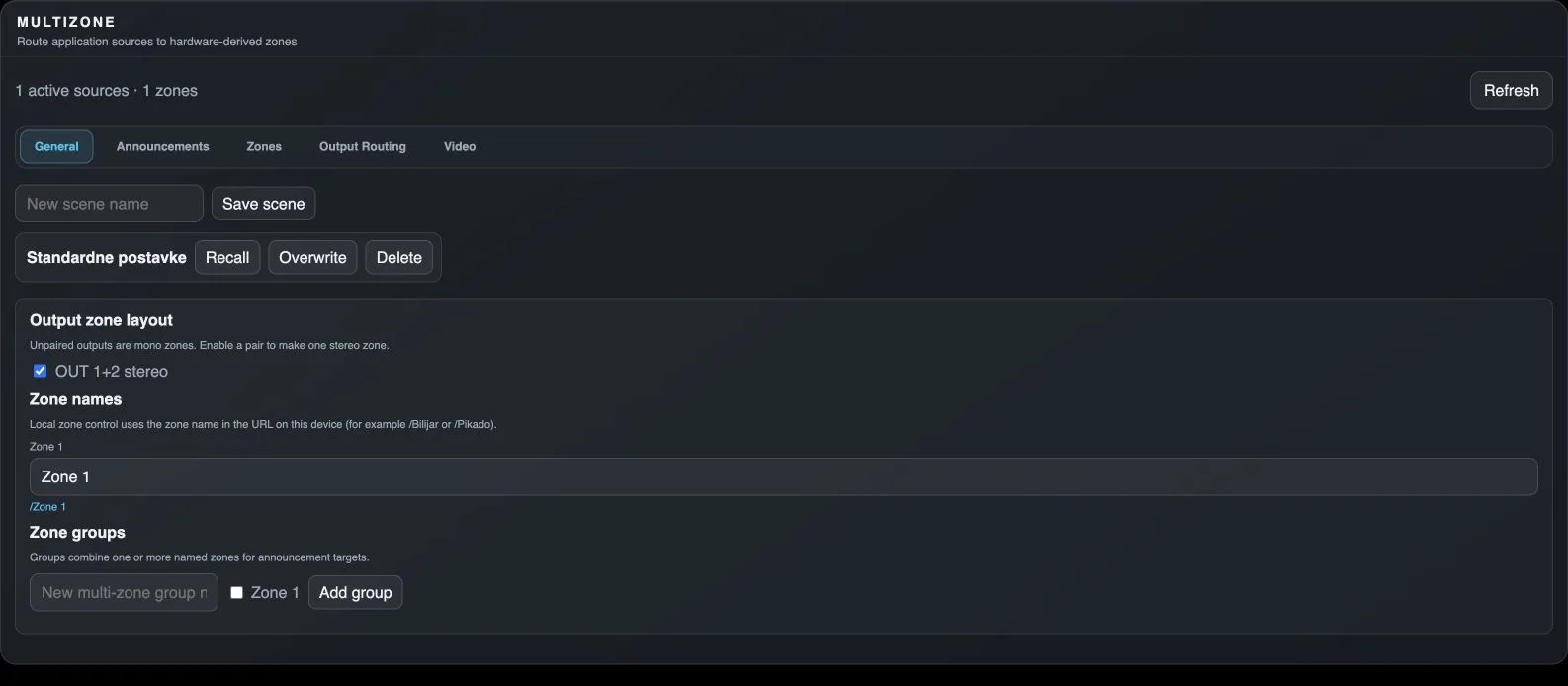
Fetches the current Multizone state from Core again.
General
Opens the general settings of the selected main section.
Announcements
Opens audio announcements, text to speech and scheduled announcements.
Zones
Opens zone source assignment, names, roles and volume.
Output Routing
Opens the matrix from zone buses to physical outputs.
Video
Opens browser-tab sharing, TV addresses and the sharing PIN.
New scene name
Names a new scene. Scenes store the operating arrangement of sources and zones with their associated state.
Save scene
Stores the current state as a new named scene.
Recall
Restores the stored scene and its settings.
Overwrite
Replaces the existing scene with the current state.
Delete scene
Deletes the stored scene.
OUT x+y stereo
Combines the corresponding physical outputs into one stereo zone. Unpaired outputs form separate mono zones.
Zone name
Assigns a friendly zone name, such as Bar. The local control link is derived from this name.
Local zone page
Opens control for this zone on the same Core. Spaces and special characters are URL-encoded.
New multi-zone group name
Names a group combining zones, for example as a shared announcement target.
Zone group membership
Includes this zone in the new group.
Add group
Creates a named group from the selected zones.