
ORVESTRA · WIKI
Announcements - selected weekdays
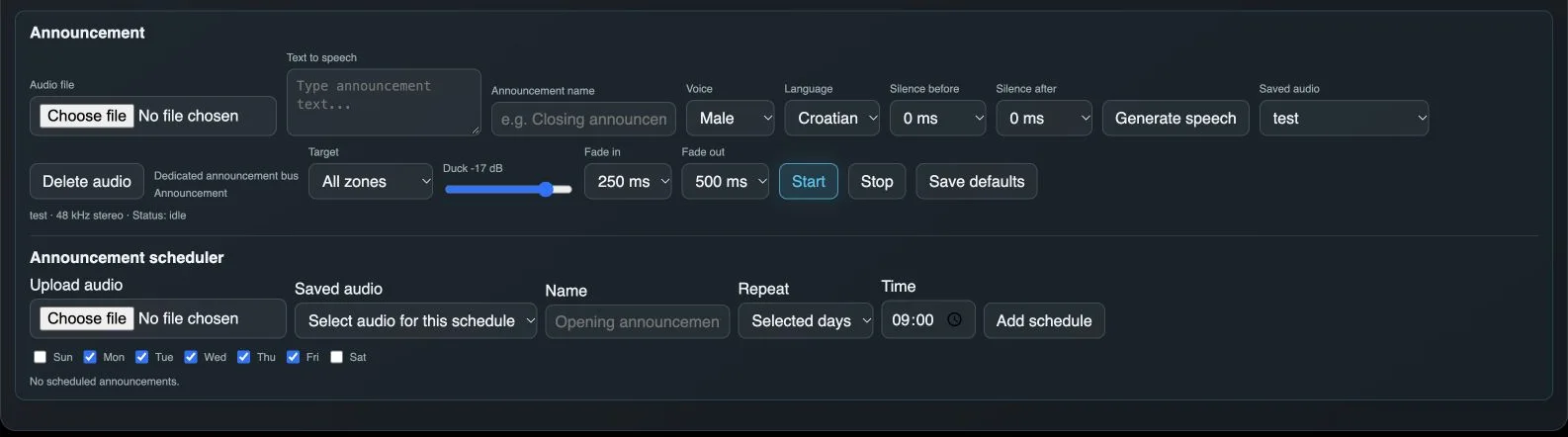
Audio file
Selects a sound file for a manual announcement. Status identifies the prepared media and playback format.
Text to speech
Text to convert into spoken audio.
Announcement name
Names the generated announcement in the library.
Voice
Chooses the voice used to generate speech.
Language
Chooses the speech language.
Silence before
Adds silence before the generated speech.
Silence after
Adds silence after the generated speech.
Generate speech
Generates and stores speech using the selected text, voice and language. Generating speech does not start the announcement.
Saved audio - manual announcement
Selects previously stored audio for manual playback.
Delete audio
Deletes the selected sound from the announcement library.
Target
Selects where the announcement will play. Announcements use a dedicated bus.
Duck
Attenuates existing music during an announcement to make speech clearer.
Fade in
Transition time at the start of the announcement and ducking.
Fade out
Transition time at the end of the announcement and when restoring the level.
Start
Plays the selected announcement on the selected target.
Stop
Stops the current announcement.
Save defaults
Stores announcement defaults, including target and transition settings.
Upload audio
Uploads an audio file to the library for scheduled announcements.
Saved audio - schedule
Chooses stored audio for a new scheduled announcement.
Schedule name
Names the scheduled announcement.
Schedule repetition
Selects how often the announcement runs.
Time
Sets the scheduled start time.
Add schedule
Adds a schedule for the selected audio and announcement target.
Weekdays
Chooses the days on which an announcement repeats. Shown only for Selected days.