
ORVESTRA · WIKI
Zones - source assignment matrix
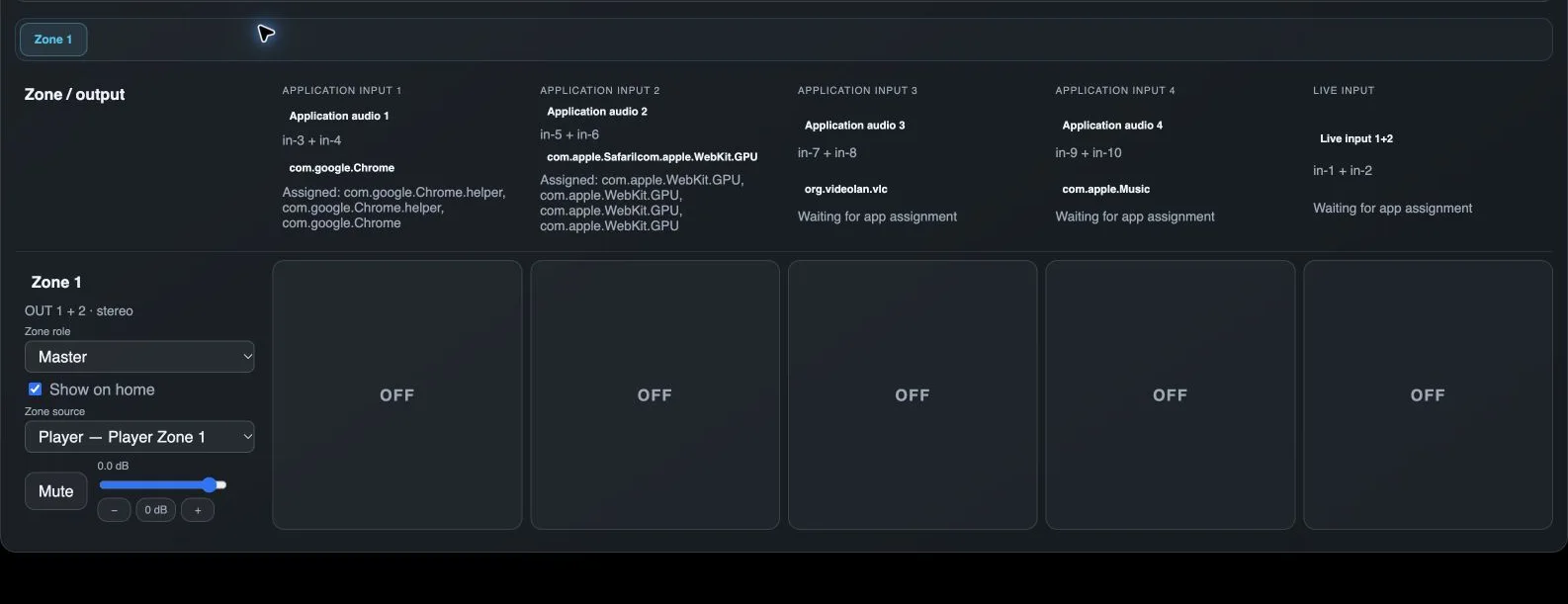
Zone selection
Selects the zone to edit in the source matrix.
Source name
Friendly name of an application input or physical input.
Application bundle ID
Associates an application with an Orvestra input on supported systems. Discovered sessions and activity appear below.
Zone name
Assigns a friendly zone name, such as Bar. The local control link is derived from this name.
Zone role
A Master has its own source. A Slave follows its Master source and volume, with its own volume acting as relative trim.
Show on home
Controls whether this zone has a volume control on Home.
Zone source
Selects this zone audio source. A Slave inherits its Master source, so its own source selector is locked.
Zone mute
Mutes only the selected zone.
Zone volume
Sets zone level; for a Slave this is relative trim against its Master.
Zone - in Multizone
Lowers the zone level.
0 dB
Resets zone gain to unity, or relative trim to zero.
Zone + in Multizone
Raises the zone level.
Source-to-zone assignment
Selects the source for this zone from the corresponding column. This assigns a source to a zone, not a bus to a physical output.