
ORVESTRA · WIKI
Multizone - Video
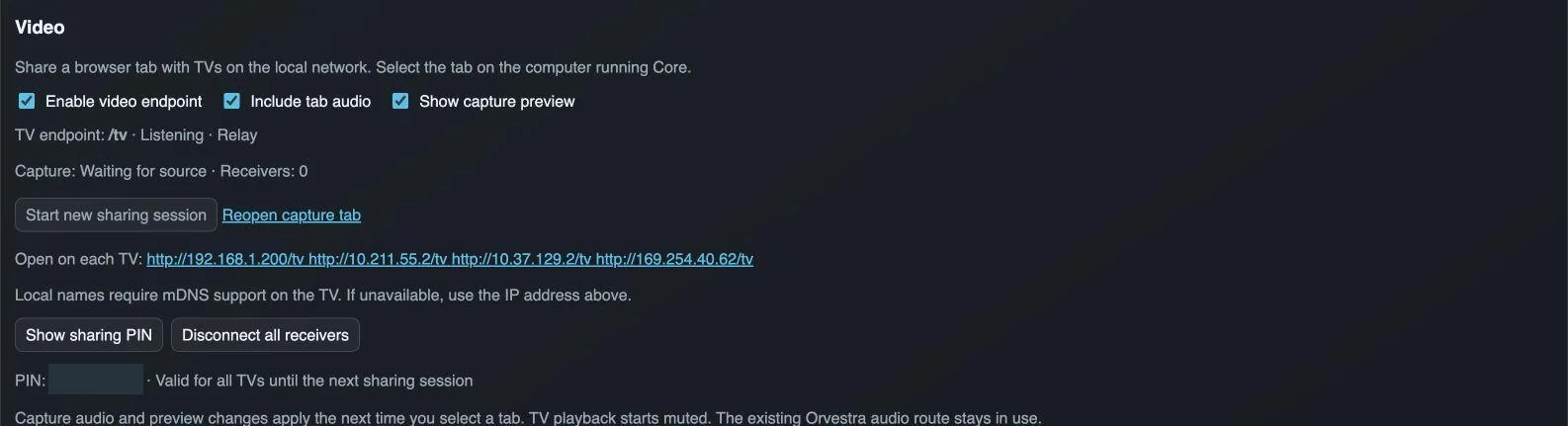
Enable video endpoint
Enables or disables the local TV video service.
Include tab audio
Requests audio from the shared tab the next time a source is selected. Support depends on the browser and operating system.
Show capture preview
Shows a preview of the captured source on the sender page.
Start new sharing session
Starts a new sharing session and opens source selection on the Core computer. A new session changes the PIN and previous pairing validity.
Reopen capture tab
Reopens the sender page of the current session to select and share a browser tab.
TV address
Opens the video receiver. Use the network interface reachable by the TV, rather than an unrelated virtual network.
Show sharing PIN
Shows the TV pairing PIN for the current sharing session.
Disconnect all receivers
Disconnects all currently connected video receivers.