
ORVESTRA · WIKI
DSP - parametric EQ
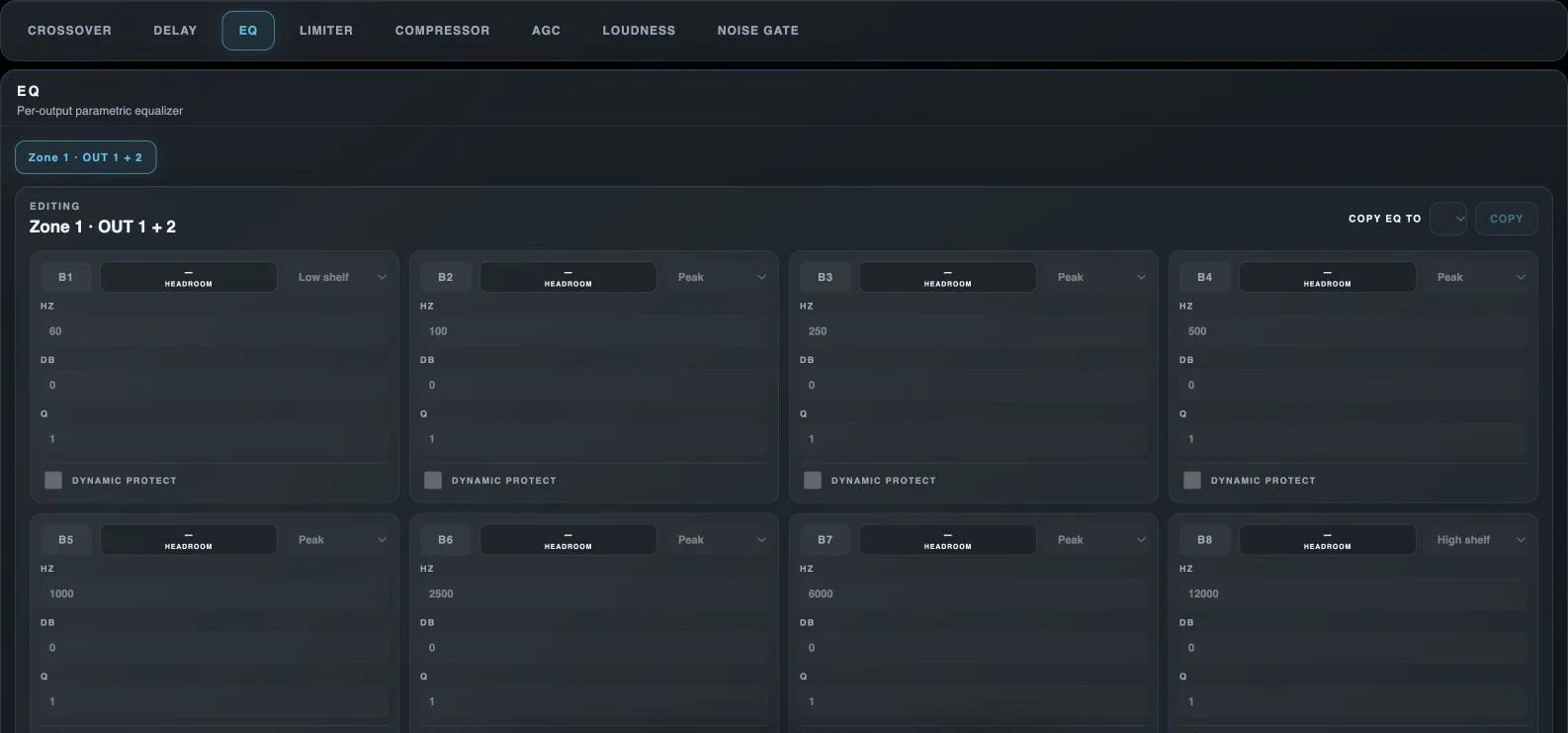
Crossover
Opens output high-pass and low-pass filters.
Delay
Opens output delay and polarity inversion.
EQ
Opens the output parametric equalizer.
Limiter
Opens input/output limiters and output speaker protection.
Compressor
Opens input and output compressors.
AGC
Opens automatic source-level control.
Loudness
Opens tonal compensation for quiet listening.
Noise Gate
Opens output attenuation for signals below a threshold.
EQ output selection
Selects the output or stereo pair being edited.
Copy target
Selects another available destination for the processor settings.
Copy
Copies this processor configuration to the selected destination.
B1-B8
Enables or bypasses the corresponding parametric EQ band. Each band has its own type, frequency, gain and Q.
EQ filter type
Peak affects the region around a centre frequency; Low shelf and High shelf affect the lower or upper part of the spectrum.
EQ frequency - Hz
Centre frequency for Peak, or the transition region of a shelving filter.
EQ gain - dB
Boosts or cuts the selected frequency region.
Q - bandwidth
Sets filter bandwidth. Higher Q produces a narrower region; lower Q produces a wider region.
Dynamic protect
Enables dynamic protection of a boosted EQ band as the signal approaches the target. Additional fields appear only when enabled.