
ORVESTRA · WIKI
DSP - Crossover
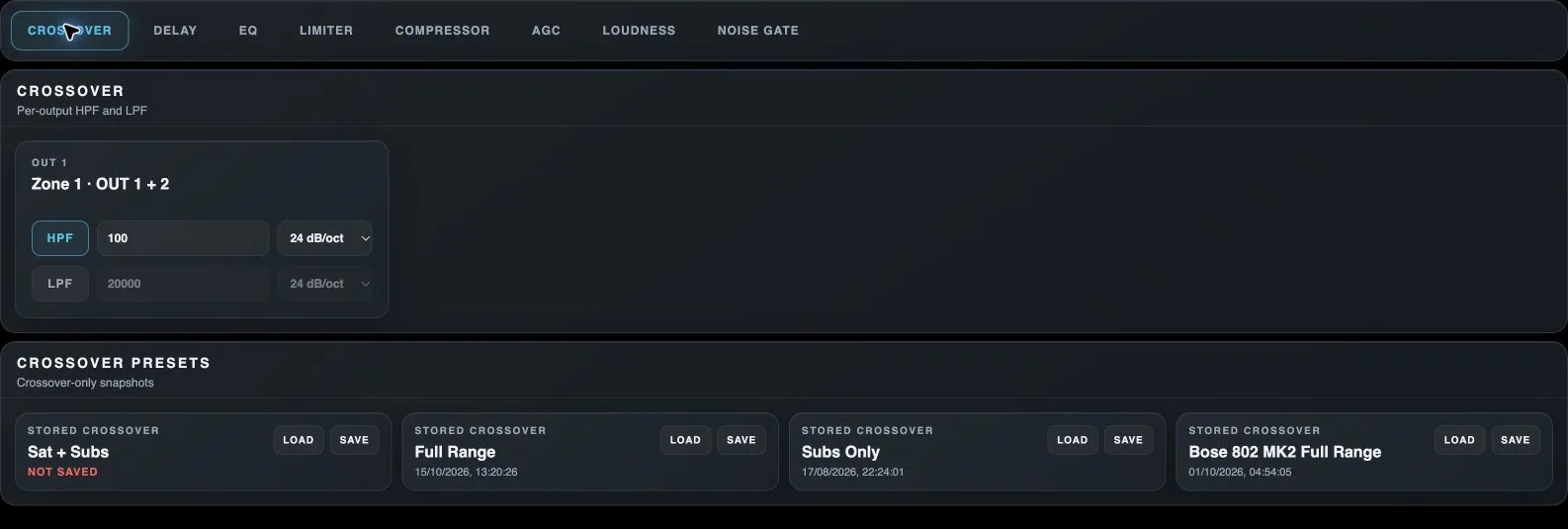
Crossover
Opens output high-pass and low-pass filters.
Delay
Opens output delay and polarity inversion.
EQ
Opens the output parametric equalizer.
Limiter
Opens input/output limiters and output speaker protection.
Compressor
Opens input and output compressors.
AGC
Opens automatic source-level control.
Loudness
Opens tonal compensation for quiet listening.
Noise Gate
Opens output attenuation for signals below a threshold.
HPF
Enables the high-pass filter, attenuating frequencies below its cutoff.
Cutoff frequency
Sets the cutoff of the corresponding HPF or LPF.
Filter slope
Sets how steeply the filter attenuates frequencies outside its passband.
LPF
Enables the low-pass filter, attenuating frequencies above its cutoff.
Load module preset
Loads the processor settings stored in this module slot, rather than a whole scene.
Save module preset
Stores the current module state in this slot, replacing its previous contents.