
ORVESTRA · WIKI
DSP - calibration and limiter presets
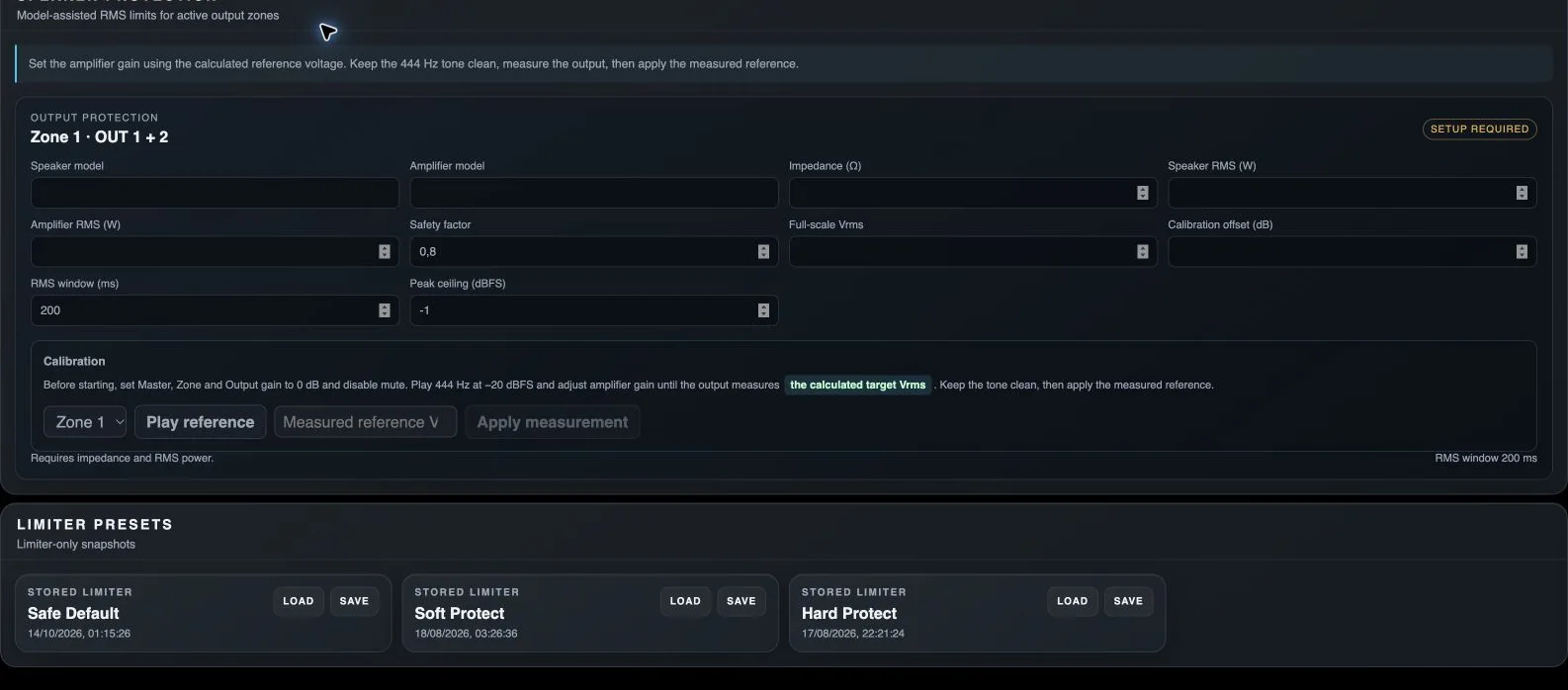
Speaker model
Descriptive loudspeaker model for the protection profile. The name does not replace impedance and power specifications.
Amplifier model
Descriptive amplifier model for the protection profile.
Impedance
Nominal load impedance used to calculate the safe output voltage.
Speaker RMS
Rated RMS loudspeaker power used in the safe-voltage calculation.
Amplifier RMS
Amplifier RMS power at the selected load. The calculation uses the lower of the available speaker and amplifier ratings.
Safety factor
Reduces the calculated permitted power to provide a safety margin.
Full-scale Vrms
Output voltage corresponding to digital full scale in the actual gain chain. Needed to convert a safe RMS voltage into a dBFS threshold.
Calibration offset
Additional calibration correction used to calculate the protection threshold.
RMS window
Averaging period for RMS protection.
Peak ceiling
Peak limit in the output protection profile.
Calibration zone
Chooses the zone receiving the reference tone.
Play reference / Stop tone
Starts or stops the reference tone used to measure amplifier voltage. Follow the displayed gain and mute instructions before calibrating.
Measured reference Vrms
Measured RMS output voltage while the reference tone is playing.
Apply measurement
Sets Full-scale Vrms to measured voltage / 0.1, offset to 0 and mode to calibrated.
Load module preset
Loads the processor settings stored in this module slot, rather than a whole scene.
Save module preset
Stores the current module state in this slot, replacing its previous contents.