
ORVESTRA · WIKI
Settings - Performance presets
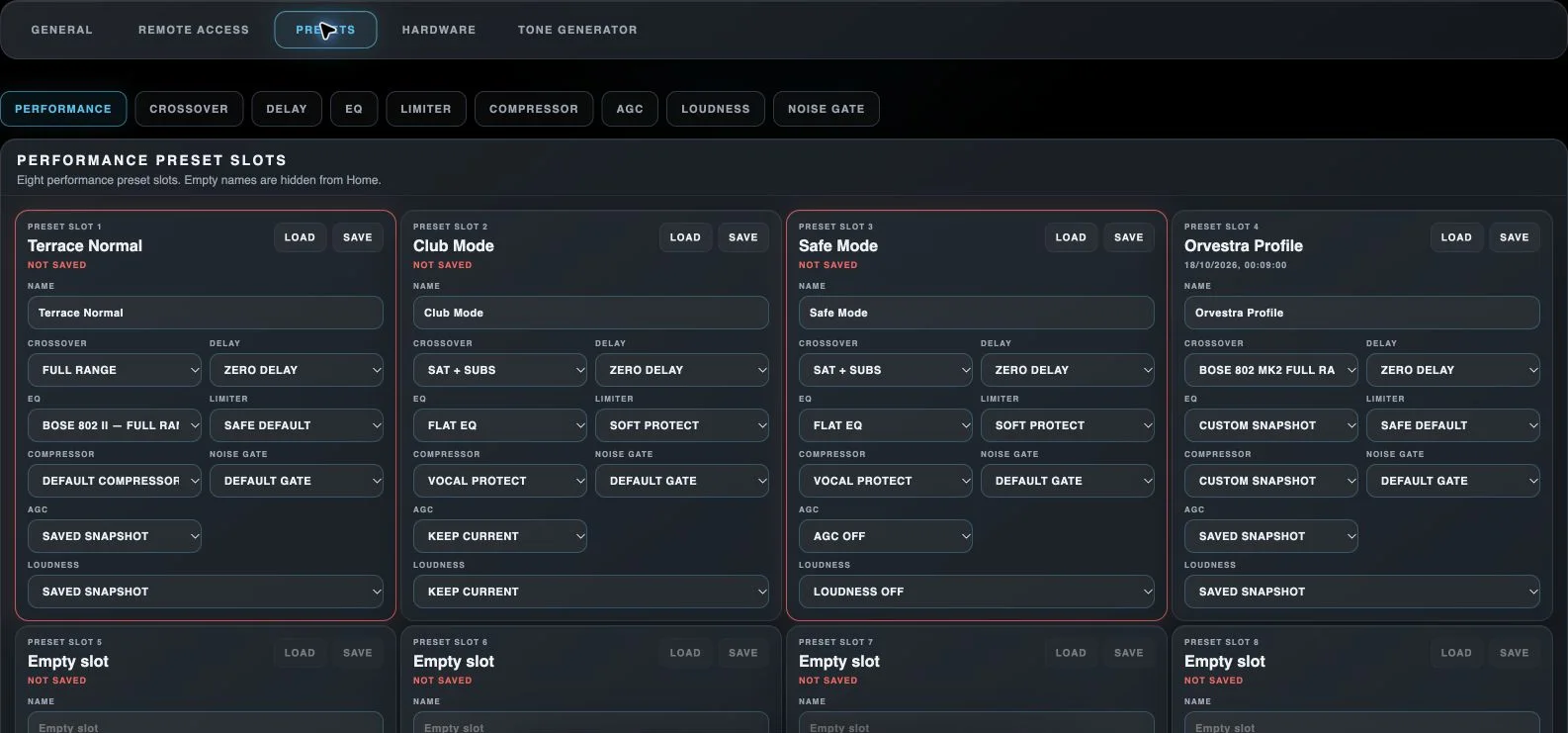
General
Opens the general settings of the selected main section.
Remote Access
Opens phone pairing and the list of previously paired devices.
Presets
Opens stored settings and preset-slot names.
Hardware
Opens audio-interface detection and selection.
Tone Generator
Opens the test-signal generator.
Performance
Opens Performance preset-slot editing. Selecting this tab only changes the view.
Crossover
Opens Crossover preset-slot editing. Selecting this tab only changes the view.
Delay
Opens Delay preset-slot editing. Selecting this tab only changes the view.
EQ
Opens EQ preset-slot editing. Selecting this tab only changes the view.
Limiter
Opens Limiter preset-slot editing. Selecting this tab only changes the view.
Compressor
Opens Compressor preset-slot editing. Selecting this tab only changes the view.
AGC
Opens AGC preset-slot editing. Selecting this tab only changes the view.
Loudness
Opens Loudness preset-slot editing. Selecting this tab only changes the view.
Noise Gate
Opens Noise Gate preset-slot editing. Selecting this tab only changes the view.
Load performance preset
Loads the selected combined DSP configuration, including saved AGC/Loudness snapshots when present.
Save performance preset
Stores current module settings in the selected performance slot.
Slot name
Renames this slot. Empty names hide standard module slots from quick DSP views, and Performance slots from Home.
Crossover in performance preset
Selects a stored Crossover module snapshot for this performance preset. Custom snapshot identifies values that do not match a named module slot.
Delay in performance preset
Selects a stored Delay module snapshot for this performance preset. Custom snapshot identifies values that do not match a named module slot.
EQ in performance preset
Selects a stored EQ module snapshot for this performance preset. Custom snapshot identifies values that do not match a named module slot.
Limiter in performance preset
Selects a stored Limiter module snapshot for this performance preset. Custom snapshot identifies values that do not match a named module slot.
Compressor in performance preset
Selects a stored Compressor module snapshot for this performance preset. Custom snapshot identifies values that do not match a named module slot.
Noise Gate in performance preset
Selects a stored Noise Gate module snapshot for this performance preset. Custom snapshot identifies values that do not match a named module slot.
AGC in performance preset
Assigns a saved AGC configuration to this performance preset. Saved snapshot preserves its existing snapshot; Keep current means there is no saved snapshot to replace current processing.
Loudness in performance preset
Assigns a saved Loudness configuration to this performance preset. Saved snapshot preserves its existing snapshot; Keep current means there is no saved snapshot to replace current processing.