
Orvestra

ORVESTRA · WIKI

Product - image and name
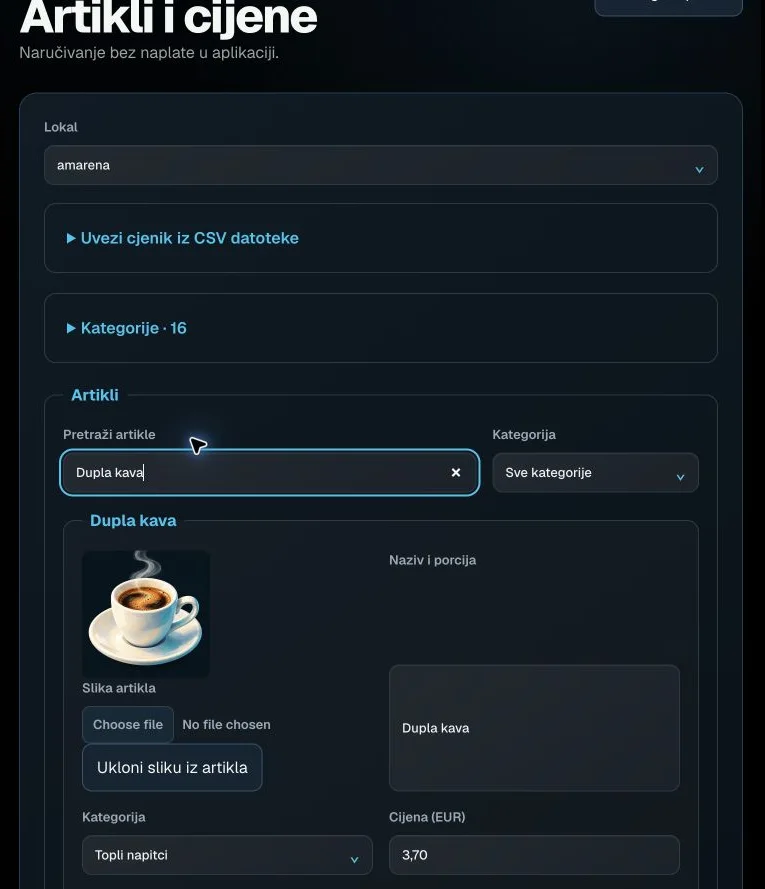
Product - image and name
Actual interface capture from the user guide.

Main menu / Back

Returns to the portal function selector.

The browser session remains signed in.

Venue

Selects the venue whose data and settings you are viewing.

The list follows account permissions. Editors may lock it while there are unsaved changes.

Import price list from CSV

Expands or collapses the CSV import tool.

Opening this section does not import anything.

Categories

Expands product category editing. The heading includes the category count.

Each category has a name, type and position.

Search products

Filters visible products by name.

Text search; clearing it restores the full view. Products are not deleted.

Category filter

Limits the product view to a single category.

All categories or an existing category.

Product image

Selects a product image and links it to the draft product.

JPEG, PNG or WebP, up to 10 MB. Reduced to at most 640 px. Save and publish the catalogue after upload.

Remove product image

Removes the image link from this draft product.

The product remains; save and publish to make the change visible to guests.

Name and serving

Product name and any size/serving text shown to guests.

Required, up to 200 characters.