ORVESTRA · WIKI
Orders - bar workflow
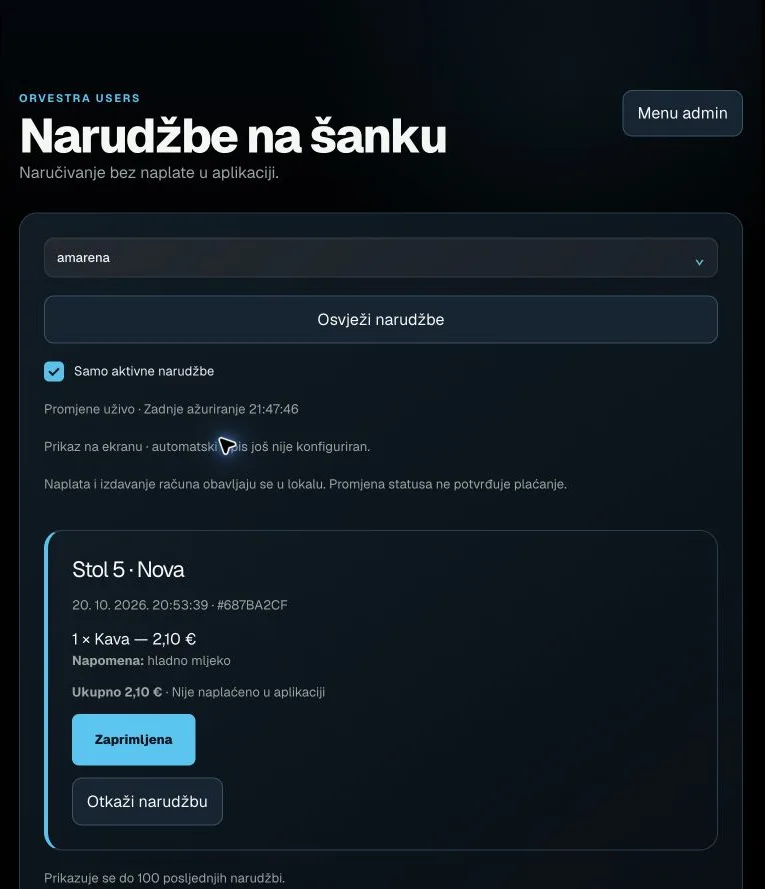 Actual interface capture from the user guide.
Menu admin
Opens products, categories, images, prices and availability.
Availability depends on account permissions.
Venue
Selects the venue whose data and settings you are viewing.
The list follows account permissions. Editors may lock it while there are unsaved changes.
Refresh orders
Manually reloads the selected venue's orders.
Changes normally arrive live; also useful for retrying after an error.
Active orders only
Hides closed and cancelled orders.
On: active orders. Off: also show history. Up to the latest 100 orders.
Received
The waiter acknowledges a new order.
New becomes In preparation; the guest receives the status update. Does not confirm payment.
Cancel order
Cancels an active order after confirmation.
Final status Cancelled. Does not perform a refund.
