
Orvestra

ORVESTRA · WIKI

Juke and chat - settings
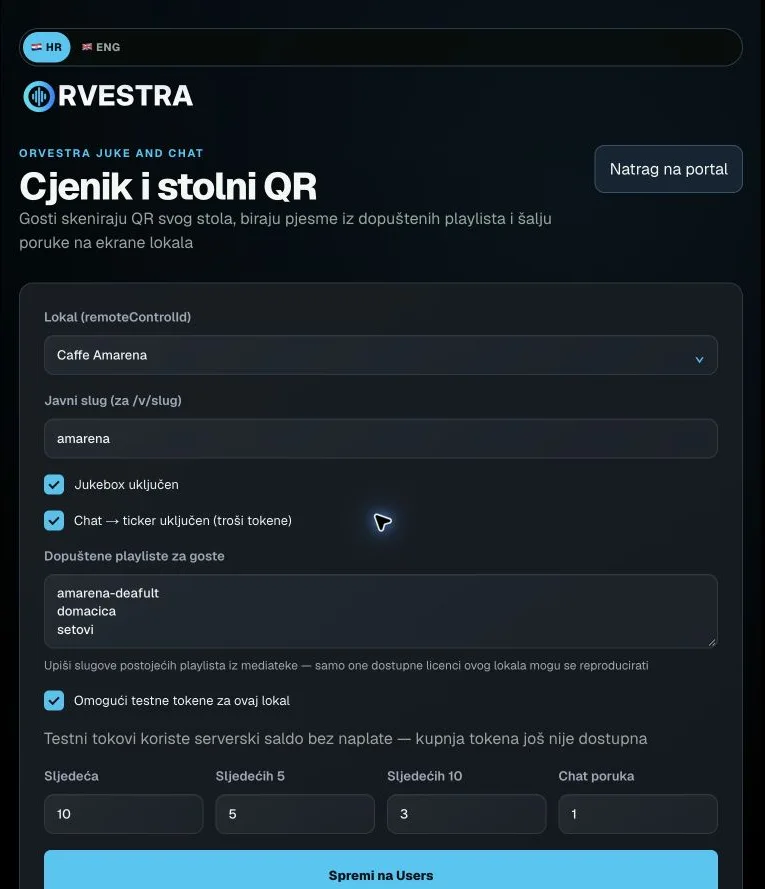
Juke and chat - settings
Actual interface capture from the user guide.

HR / ENG

Selects the page language.

Croatian or English; content names keep their entered wording.

ORVESTRA

Opens the public ORVESTRA website.

Link outside the Users portal.

Main menu / Back

Returns to the portal function selector.

The browser session remains signed in.

Venue

Selects the venue whose data and settings you are viewing.

The list follows account permissions. Editors may lock it while there are unsaved changes.

Public slug

Readable venue identifier in the guest /v/slug link.

Example: amarena. Save the change to Users.

Jukebox enabled

Allows guest song requests at this venue.

On / off.

Chat to ticker enabled

Allows guest messages on the venue ticker.

On / off; uses the configured token price per chat message.

Guest playlist allow-list

Controls which playlists guests may request songs from.

Enter existing playlist slugs. They must be available to the venue licence.

Enable test tokens

Enables the server balance for testing guest actions at the venue.

Separate from token purchases or order payments.

Next

Token cost of a next-song request.

Token amount; the displayed value is the venue configuration.

Next 5

Token cost of requesting placement within the next five tracks.

Token amount; the displayed value is the venue configuration.

Next 10

Token cost of requesting placement within the next ten tracks.

Token amount; the displayed value is the venue configuration.

Chat message

Token cost of a ticker message.

Token amount; the displayed value is the venue configuration.