
Orvestra

ORVESTRA · WIKI

Music - folder actions
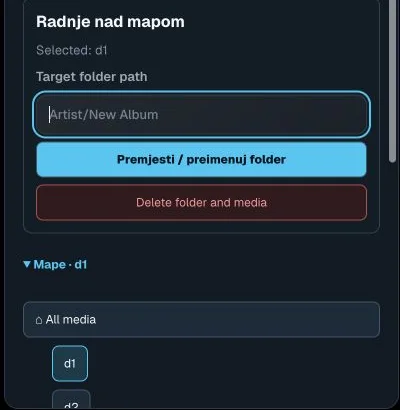
Music - folder actions
Actual interface capture from the user guide.

Target folder path

Destination path for moving or renaming the selected folder.

Example Artist/New Album. Editing the field alone does not move files.

Move / rename folder

Saves a new path for the selected folder and its media.

Server operation; check the destination and selected folder.

Delete folder and media

Starts deletion of the selected folder and its media.

Affects the whole folder and files, not just one playlist.

Folders / Browse folders

Expands or collapses library folder browsing.

Navigation only; expanding does not move files.

Select folder

Filters the music library by folder.

All media shows everything. The arrow beside a folder expands subfolders.