ORVESTRA · WIKI
Video manager
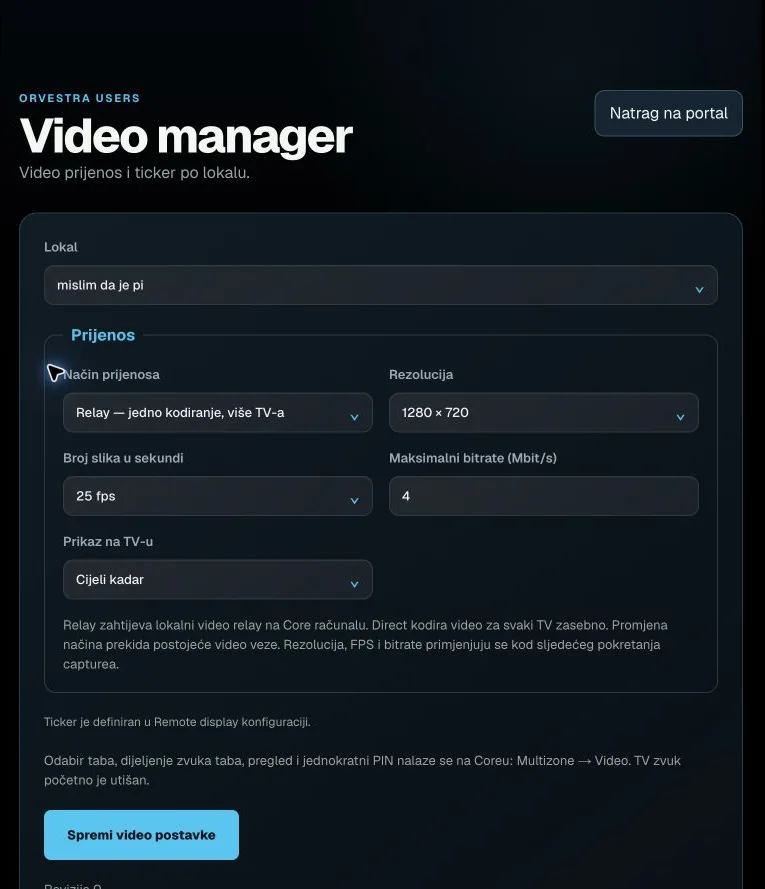 Actual interface capture from the user guide.
Main menu / Back
Returns to the portal function selector.
The browser session remains signed in.
Venue
Selects the venue whose data and settings you are viewing.
The list follows account permissions. Editors may lock it while there are unsaved changes.
Transport mode
Selects how video reaches TV receivers.
Relay: encode once for multiple TVs, requires the local relay. Direct: encode separately, up to 4 TVs. Changing mode interrupts existing connections.
Resolution
Target video frame size.
960 × 540 / 1280 × 720 / 1920 × 1080. Applied the next time capture starts.
Frame rate
Target video transmission frame rate.
25 / 30 / 50 fps; actual performance depends on the source and computer.
Maximum bitrate
Upper video bitrate setting.
1 to 12 Mbit/s, 0.5 steps. Does not guarantee a constant measured bitrate.
TV fit
Controls how video fits the receiver screen.
Whole frame preserves the image; Fill screen may crop edges.
Save video settings
Saves the selected venue's video profile.
An active Core fetches settings within 30 seconds. Resolution, FPS and bitrate apply to the next capture.
