
ORVESTRA · WIKI
Display - save and cancel
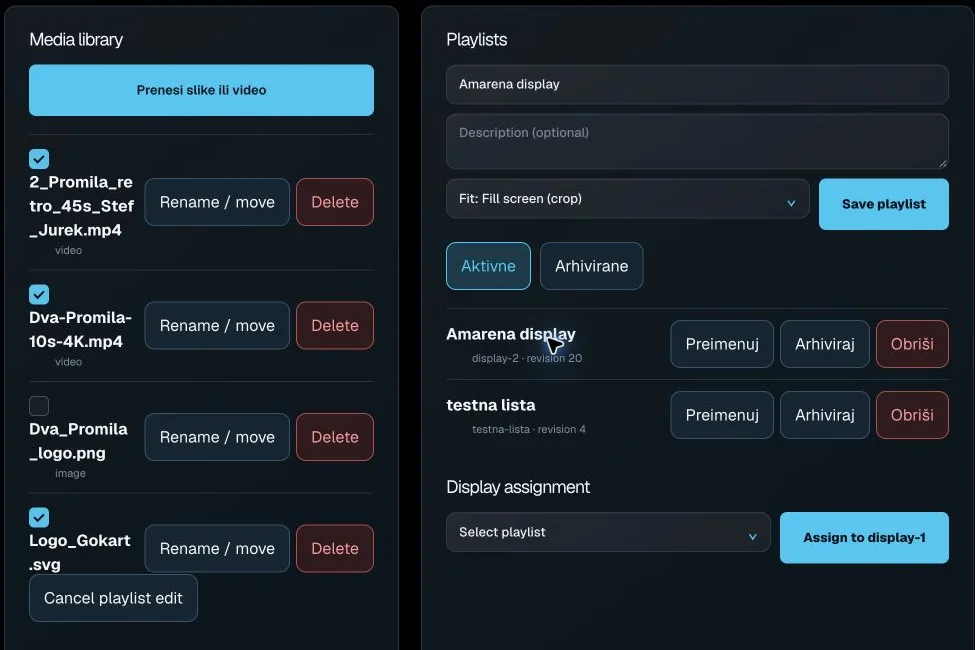
Upload images or video
Uploads images or video adverts to the display media library.
Select media asset
Selects an asset for adding to an advertising playlist.
Preview media
Opens an image or video preview in the right panel.
Move / rename
Opens filename and folder path editing.
Delete media
Starts deletion of the selected server media asset.
Cancel playlist edit
Closes playlist editing and clears local selection/form fields.
Playlist name
Name of the new or currently edited advertising playlist.
Description
Additional playlist description.
Default display fit
Default image/video fitting mode for the playlist.
Save playlist
Saves the advertising playlist, item order/settings and ticker.
Active
Shows active advertising playlists.
Archived
Shows archived advertising playlists.
Open advertising playlist
Loads its saved content, ticker and order into the editor.
Rename
Starts renaming an advertising playlist.
Archive
Moves a playlist from the active list to the archived list.
Delete playlist
Starts permanent deletion of the advertising playlist.
Playlist for display
Selects an active playlist to assign to a display.
Assign to display-1
Saves the chosen playlist as the display-1 assignment.