ORVESTRA · WIKI
Display - ticker and image advert
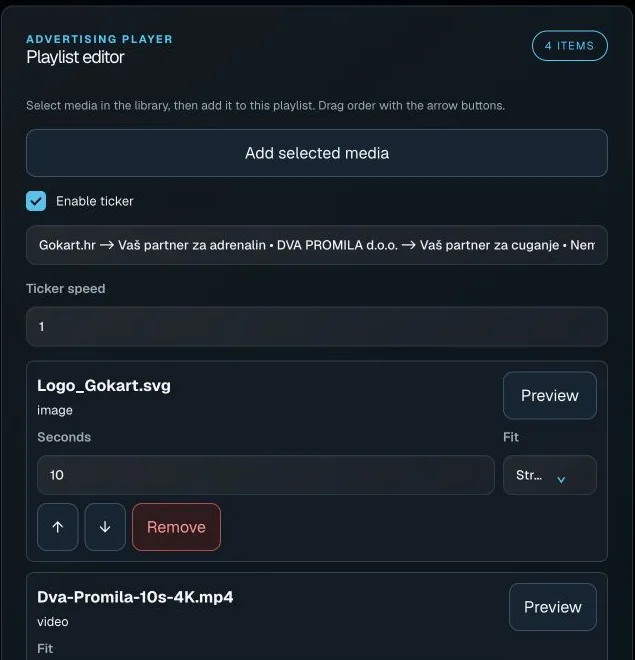 Actual interface capture from the user guide.
Add selected media
Adds selected library assets to the local playlist.
Then check the order and save the playlist.
Enable ticker
Enables the text ticker for the advertising playlist.
On / off. The same configuration is used by the video overlay.
Ticker text
Text of the message moving across the display.
Save the playlist after editing. Chat messages arrive through the separate guest flow.
Ticker speed
Advertising ticker scrolling speed.
0.1 to 10, step 0.1; initial value 1.
Preview media
Opens an image or video preview in the right panel.
Previewing is not assignment to a production display.
Seconds
Display duration of the corresponding image.
1 to 3600 seconds, step 1. Video duration is not controlled by this image field.
Fit
Fitting mode for this advertising item.
Fill: fill and crop excess. Contain: show the whole image with possible bars. Stretch: stretch to fit.
Move up
Moves the corresponding track or advert one place earlier.
Local editor; save the playlist. May be disabled for the first item.
Move down
Moves the corresponding track or advert one place later.
Local editor; save the playlist. May be disabled for the last item.
Remove from playlist
Removes an item from the local playlist content.
The file remains in the library. Save the playlist to keep the change.
